How Synk AI Home Turns Wellness Goals Into Today's Plan
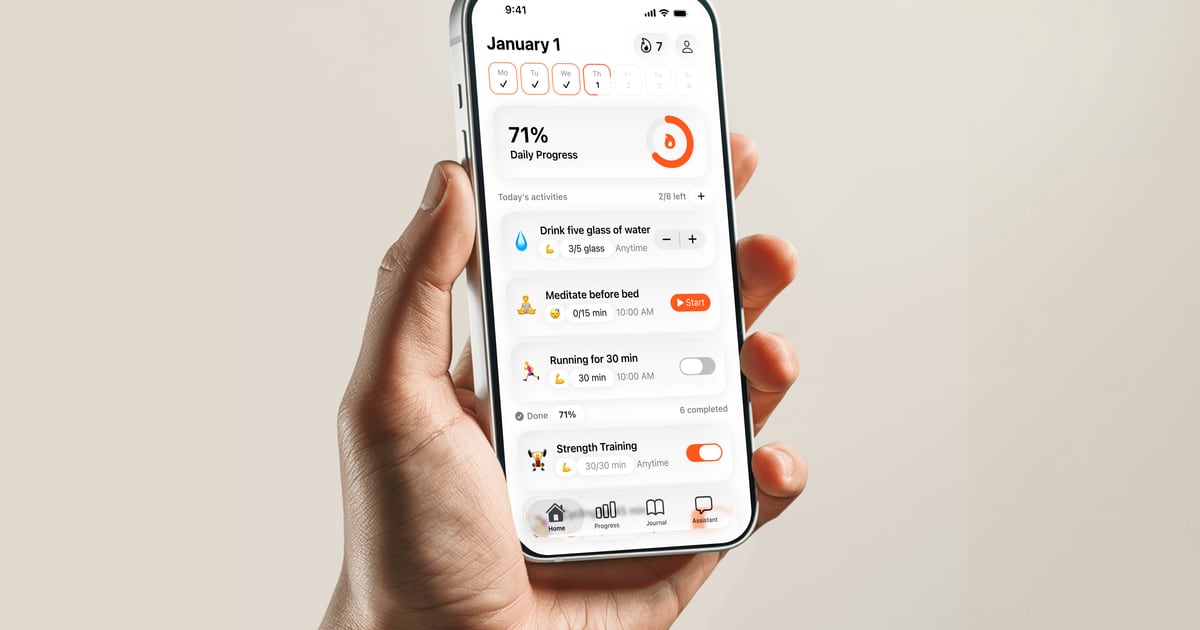
A closer look at how the Home surface helps users complete scheduled activities, use timers, track counts, and keep wellness routines moving.
Key takeaways
- Home is designed around daily execution, not browsing dashboards.
- Users can complete toggle, count, amount, and timed activities from one surface.
- Future activities can remain visible without encouraging early completion.
- Optimistic local updates keep the experience fast while sync catches up later.
Home answers what should I do today
A wellness plan only works if it becomes visible at the moment of action. Synk AI Home is the daily command center where goals become scheduled activities the user can actually complete.
Instead of making the user interpret charts first, Home starts with the practical question: what needs attention today? The answer can be a short breathing session, a hydration count, a medication reminder, a walk, a workout timer, or a journal-related activity.
Different activity types fit different routines
Not every health action should be tracked the same way. Synk AI supports several activity patterns so users can match the tracking method to the real behavior.
A simple yes-or-no routine can be a toggle. A hydration routine can use counts. A workout, walk, meditation, breathing session, or focus block can use a timer. That keeps the interface practical for the way health routines actually happen.
- Toggle activities work for habits like vitamins, stretching, or completing a breathing session.
- Count and amount activities work for glasses of water, minutes, servings, or custom units.
- Timed activities work for workouts, walks, meditation, breathing, and focus sessions.
- Future activities can be shown in context while staying disabled until the right time.
Fast local completion protects momentum
Daily routines lose value when logging feels slow. Synk AI uses local-first updates so completion can feel immediate. The UI can update first, then persistence and optional sync can catch up.
If the user is offline, the action can still be captured locally. When sync is enabled, the app can process the queued change later. This matters because wellness data often gets captured in small ordinary moments.
Streaks support consistency
Synk AI supports both activity streaks and daily streaks. Activity streaks help users see consistency for a specific routine. Daily streaks help users understand whether they completed the full scheduled plan for the day.
The goal is not to make health feel punitive. Streaks give feedback on consistency while the broader app context helps users adjust a plan that is not realistic.
Build the daily plan behind your wellness goals
Synk AI turns goals, activities, journals, and HealthKit-derived progress into a clear daily action plan.
Explore Synk AI